
We know that doing anything more than a basic ship name search can be a challenge in ShipIndex.org. And, I admit, even that can be tricky sometimes. People have often don’t realize that there are lots of additional ships in many search results with the search term as just the start of the vessel name. For instance, a search for the term “cleveland” brings back multiple vessels named “Cleveland”, and many citations not yet associated with a specific vessel. But there’s also the “See other matching ships” button, which would always show every citation that had the word “Cleveland” in it, even if it was referring to, say, the location where the ship was built, or where a powerboat is registered, or something like that.
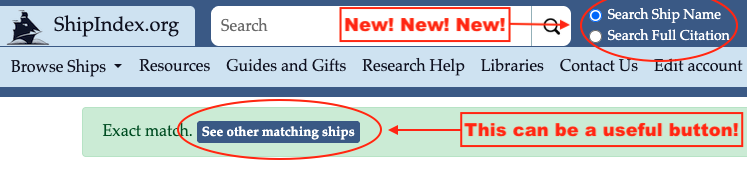
So we’ve cleaned up this process quite a bit. Now, on the home page, you have two buttons to the right of the search box: one says, “Search Ship Name” and the other says “Search Full Citation”. This greatly simplifies some of the advanced searching that has always been available, but hard to implement, and much harder to remember!
If you’ve done a search for “cleveland” with “Search Ship Name” selected, it’ll return all of the citations where the ship is named “Cleveland”. When you click on “See other matching ships” now, you see all the other ships with the word “cleveland” in the vessel name, but nothing else. So now it’s easy to find “Cape Cleveland” or “Maersk Cleveland” or “Knot in Cleveland Anymore”(!). This is the equivalent of the search “@ship_name cleveland” in the prior iteration. You can see it’s a big improvement right there!
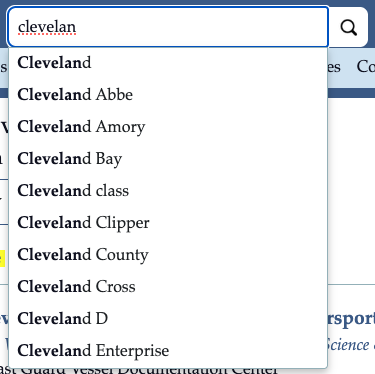
When you type in a ship name, the system will now display the first ten valid ship name results, which is a great way to see how many different ships start with the term you’re using, and to remind you that they’re there.
If you search for “cleveland” and select “Search Full Citation”, (or click “Search citations too” under the “Ships named Cleveland” header) you’ll get thousands of results where one of the citations has the word “cleveland” in it, somewhere. As an example, if I click on “Alleghany” from the first results page, then search in the page (using Ctrl-F, for instance) for “cleveland”, I find a mention of a steamer named Alleghany in an 1855 directory, that was from Cleveland, Ohio. Remember that the mention of your search term (or another mention of your search term!) might be on subsequent results pages. You need to search every results page to ensure you’ve found all the mentions.

This method of searching across full citations can sometimes be useful if, say, you’re looking for a captain’s name, and that name is pretty unusual. Remember that we only show what’s in the citation in the resource. When Mystic Seaport digitized many 19th century American shipping directories, they also transcribed the information they found there, including the captain’s name at the time that the data was collected. That can sometimes help you discover a captain, but not if his last name was, say, Johnson (thousands of results!). Though, if you’re trying to search in that collection of Mystic directories specifically, a search of “johnson mystic”, with “Search Full Citation” selected, returns only 41 ship names – which is a bit more manageable. (But then you get to the ship name “Eliza”, which has 2724 citations, so you’ll need to search through the 28 results pages just for Eliza, and the search is not doing an adjacency search, so the terms may not be from the same citation.)
The site remembers the button you selected last time, so keep that in mind when doing your search. If you’ve found this new functionality to be useful, please let me know! If you don’t like it, I’d love to hear that, as well.
(Finally, you can still do the complicated advanced searches that are explained here. They’re not for everyone, but if you’re searching for, say, a ship whose name ends with “Castle” and starts with “Ken-something”, you could do this search: “^ken* castle$” to get the six ship names that meet those requirements.)